MultistreamRevenueTracker
Multistream Revenue Tracker
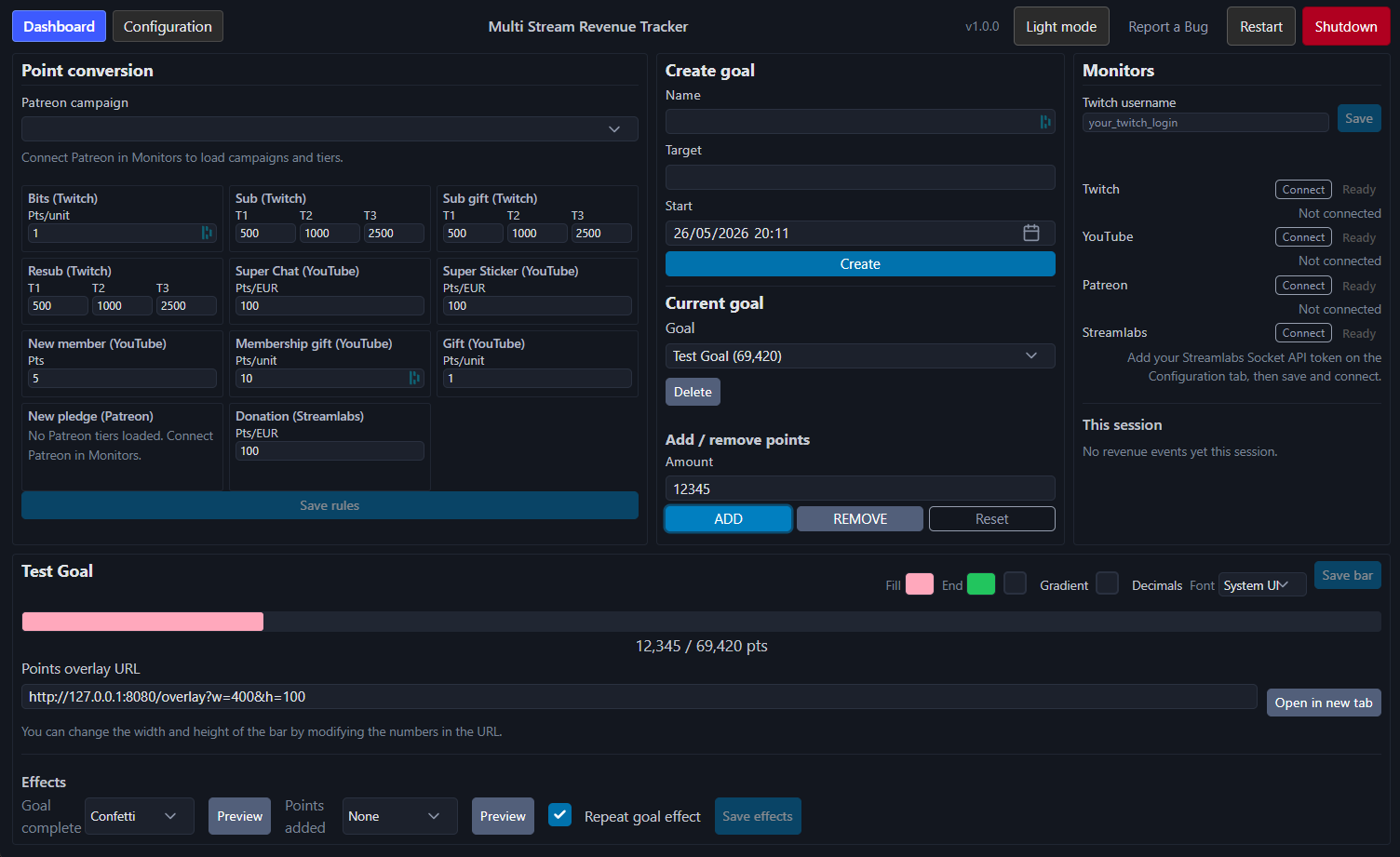
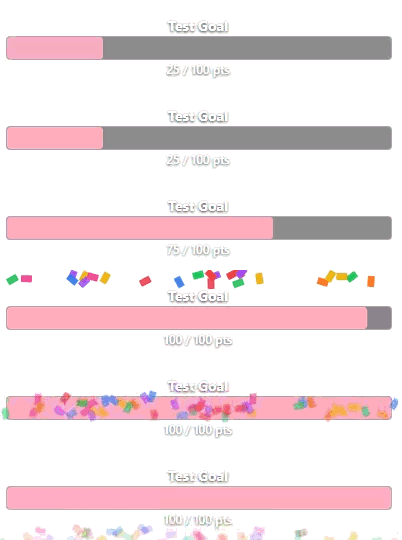
A dashboard for tracking all subs/donations/memberships etc across twitch, youtube, patreon, and streamlabs in one place. Assign point values to each type of contribution so that you can have cross-platform community driven goals! Includes progress bar and subathon overlays.
Legal: Privacy Policy · Terms of Service
Quick Note
This app is currently undergoing google verification, which can take four to six weeks. As such youtube monitoring will not work for now. If you contact me directly and provide your email address I can add you as a test user in the meantime - if not then watch this space for updates.
Support
If this is useful please consider giving me a job :) Or if you can’t, I’d really appreciate a coffee
Quick start
- Run the app, a browser tab will open automatically.
- Click Configuration. Set your base currency.
- On the Dashboard, under Monitors, set up each platform you use (steps below).
- Create or select a goal and specify a points target.
- Set point conversion rules (how much should each event be worth in points)
- For OBS add Browser Sources to display point progress and/or subathon timer on stream
Twitch
Tracks: Bits, subs, sub gifts, resubs.
Before you connect
- On the Dashboard, enter your Twitch username and click Save.
Connect
- Under Monitors click Connect next to Twitch.
- Complete the Twitch login in your browser when prompted.
- When status shows Active, Twitch events are being monitored.
YouTube
Tracks: Super Chats, Super Stickers, new memberships, membership gifts.
Before you connect
- Start your YouTube stream (you can try connecting beforehand but you will get an error).
- The Google account you sign in with must own the channel.
Connect
- Under Monitors, click Connect next to YouTube.
- Sign in with the Google account that owns the channel and allow the requested access (read-only YouTube data — used to read your live chat).
- When status shows Active, YouTube events are being monitored.
Patreon
Tracks: New paid pledges on your campaign (note this will only detect new pledges that occur whilst you are monitoring. Pledges received off stream are not counted).
Connect
- Under Monitors, click Connect next to Patreon.
- Approve access in the browser, then close the tab when it says you can.
- If you have more than one campaign, pick the active one from the Patreon campaign dropdown on the dashboard.
- Point conversion will list one card per Patreon tier after loading.
Streamlabs (donations only)
Tracks: Donations that go through Streamlabs (for example PayPal or card donations).
Before you connect
- Open Streamlabs API Settings.
- Create an API Token with access to the socket (copy the token).
Connect
- Open Configuration in the app.
- Paste the token into Streamlabs Socket API token and click Save configuration.
- On the Dashboard, under Monitors, click Connect next to Streamlabs.
Treat the token like a password. Do not stream it!
Goals, points, and session list
- Point conversion (left on the dashboard): how many points each event type earns. Save when you change values.
- Goals (centre): create a goal, set target points, and mark one as current. Progress uses events since that goal’s start time.
- This session (table): revenue seen this run. REMOVE / ADD toggles whether an event counts toward the goal (useful for correcting mistakes or duplicates).
Exchange rates are loaded automatically for converting donations and Super Chats into your base currency.
OBS overlay
Add a Browser Source in OBS:
http://127.0.0.1:8080/overlay?w=400&h=100
You can specify the size of the bar by changing the url, w=100&h=50 would create a bar with a width of 100 pixels and height of 50 pixels. Customise bar colours and font on the dashboard (Save bar). This url assume you’ve not updated the port number used in the configuration tab.
Subathon timer overlay
Add a second Browser Source for the countdown timer:
http://127.0.0.1:8080/timer?w=400&h=120
Control the timer and points-to-seconds conversion on the dashboard Subathon panel.
Configuration tab
| Setting | What it does |
|---|---|
| Enable test events | Shows test buttons on the dashboard (for practice; marked as test in the database) |
| Log Chat Messages | Messages in youtube or twitch streams will be logged |
| Require websocket token | Force overlays to require per session token for access to improve security |
| Base currency | Currency used for point rules and display |
| UI port | Dashboard address port (needs Restart after change) |
| Twitch duplicate timeout | Ignores a matching resub shortly after a sub (reduces double-counting) |
| Streamlabs token | Required only if you use the Streamlabs monitor |
Save configuration applies most changes immediately. Restart is required for UI port, websocket token, and duplicate-timeout changes to take effect.
Updating
To update, download the latest executable from GitHub Releases and replace the binary you have been using. Leave config.json and the data folder untouched so your settings, goals, and history are preserved.
Tips
- One monitor stopping does not stop the others. Use Shutdown when you want to exit the app completely.
- Closing the tab will trigger shutdown to run in the background, you wont be able to reopen it without relaunching the application.
Bring your own OAuth apps (advanced)
By default the release build uses bundled developer credentials for Patreon and Google so you don’t need to register anything. If you’d rather run against your own apps (to avoid sharing API quota or for additional security), open Configuration → Advanced and:
- Patreon: paste your Client ID and Client Secret (register at Patreon Clients, redirect URI
http://localhost:8765/callback). - YouTube / Google: paste the full client_secret JSON Google gives you (Application type: Desktop app, scope
.../auth/youtube.readonly). Create one at Google API Console → Credentials.
Empty fields fall back to the bundled defaults.
Building from source (Windows)
For local development, set OAuth credentials as environment variables:
| Variable | Required for build |
|---|---|
TWITCH_CLIENT_ID |
Yes |
TWITCH_CLIENT_SECRET |
Yes |
YOUTUBE_CLIENT_SECRETS_PATH |
Yes — path to Google Desktop OAuth JSON |
PATREON_CLIENT_ID |
Optional (warn if missing) |
PATREON_CLIENT_SECRET |
Optional |
Run from source:
pip install -r requirements.txt
$env:TWITCH_CLIENT_ID = "..."
$env:TWITCH_CLIENT_SECRET = "..."
$env:YOUTUBE_CLIENT_SECRETS_PATH = "C:\path\to\google_client_secret.json"
python main.py
Release executable:
pip install -r requirements-build.txt
.\scripts\build_release.ps1
Output: dist/MultistreamRevenueTracker/ — ship the whole folder. PyInstaller spec: scripts/multistream_revenue_tracker.spec. Windows exe icon: res/app.ico (browser favicon: src/multistream_revenue_tracker/ui/static/icon.png).
OAuth redirect URIs for your developer apps: Twitch http://localhost:17563, Patreon http://localhost:8765/callback, YouTube desktop client (dynamic localhost).
You can view the Privacy Policy here.
URL: https://multistreamrevenuetracker.jimbexleyspeed.co.uk/PRIVACY.html
You can view the Terms of Service here.
URL: https://multistreamrevenuetracker.jimbexleyspeed.co.uk/TERMS.html